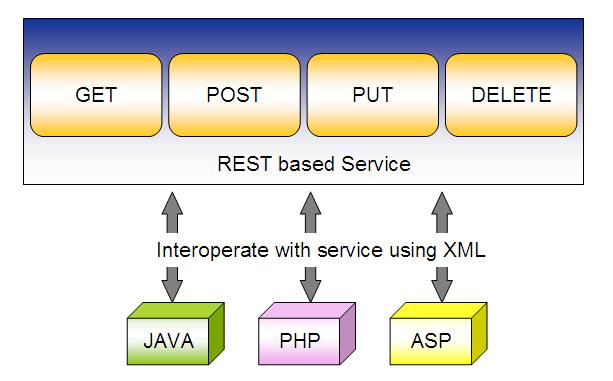
REST is an architectural style that used to write a web
service in a certain way. It is based on web-standards and the HTTP protocol. This style was defined by Roy
Fielding in 2000.
In REST architecture the main concept is the Resource which can be uniquely identified by an Uniform Resource Identifier or URI. Every resource supports the HTTP operations.
In this post I'm going to describe how to implement a RESTfull web service which I am going to create as a standalone service with an embedded Jetty server. So you do not need to deploy it in a web container.
This is a simple web service to store and retrieve music track details.
Here is the pom.xml file which contains the relevant dependencies. You can see how the embedded Jetty server is configured through the maven-jetty-plugin and the port being set to 9090.
This web service accepts requests in JSON format and responds with the same format.
Here is the data model Track.java
package com.wso2.training.manorama.model;

/**
 * Created with IntelliJ IDEA.
 * User: manorama
 * Date: 12/4/14
 * Time: 10:24 PM
 * To change this template use File | Settings | File Templates.
 */
public class Track {

    String title;
    String singer;

    public String getTitle() {
        return title;
    }

    public void setTitle(String title) {
        this.title = title;
    }

    public String getSinger() {
        return singer;
    }

    public void setSinger(String singer) {
        this.singer = singer;
    }

    @Override
    public String toString() {
        return "Track [title=" + title + ", singer=" + singer + "]";
    }

}
Now I will describe you how to implement the RESTfull web service for this. Here is the web service implementation class.
package com.wso2.training.manorama;

import com.wso2.training.manorama.model.Track;

import javax.ws.rs.*;
import javax.ws.rs.core.MediaType;
import javax.ws.rs.core.Response;

/**
 * Created with IntelliJ IDEA.
 * User: manorama
 * Date: 12/4/14
 * Time: 10:23 PM
 * To change this template use File | Settings | File Templates.
 */
@Path("/musicservice")
public class JSONService {

    @GET
    @Path("/randomtracks")
    @Produces(MediaType.APPLICATION_JSON)
    public Track getTrackInJSON() {

        // Here you can modify this code to get a random track from the available music tracks

        Track track = new Track();
        track.setTitle("Enter Sandman");
        track.setSinger("Metallica");

        return track;
    }

    @POST
    @Path("/tracks")
    @Consumes(MediaType.APPLICATION_JSON)
    public Response createTrackInJSON(Track track) {

        String result = "Track saved : " + track;
        return Response.status(201).entity(result).build();
    }
}
To map the incoming requests, we configure the web.xml (webapp/WEB-INF/web.xml)
When looking at the web service implementation java code, you can see the GET requests with the pattern /randomtracks come to the getTrackInJSON() method. It will respond with a Track object in json format. Note the @Produces(MediaType.APPLICATION_JSON) annotation.
The POST requests comes with the pattern /tracks will create a new Track object and responds with the HTTP 201 OK.The Track object should be in the json format. Note the @Consumes(MediaType.APPLICATION_JSON) annotation
com.sun.jersey.api.json.POJOMappingFeaturetrue
This will map the POJO class to json. Thus the posted json string will be converted into “Track” object automatically.
To deploy this you will need several libraries to be included in the webapp/WEB-INF/lib folder
asm-3.1.jar
jersey-client-1.18.jar
jersey-core-1.18.jar
jersey-json-1.18.jar
jersey-server-1.18.jar
jersey-servlet-1.18.jar
jsr311-api-1.1.1.jar
Since this is a standalone service you do not need to deploy it in a web container. Simply run, $ mvn jetty:run
In this post I'm going to explain how to implement a client application for the Axis2 web service we created in my previous post.
We can use the WSDL2Java tool in Axis2 to generate the client side stubs to interact with the service. You can use either the command line version of this tool or the Ant task as mentioned in the Axis2 guide [1].
In this post I will use the axis2-wsdl2code-maven-plugin to generate the client side stub.
You can use this pom to configure the axis2-wsdl2code-maven-plugin to genrate the stub code and the project structure.
Create a directory with the name SampleClient (with any name you prefer).
Save the above pom.xml with the required configuration.
Note the <wsdlFile> element contains the path to the WSDL file. In this case it is the WSDL file of the OrderProcessingService deployed in the Axis2 Server. So the Axis2Server should be up and running. <packageName> element contains the package name which contains the generated stub java code.
And configure the groupId, output directory as you prefer.
To generate the client stubs and the project structure go inside the folder SampleClient and give the following command. $mvn clean install
You will be able to see the generated folders src and target. Now you can open this maven project using your preferred IDE. Here I'm using IntellijIdea.
You will see the project structure similar to the image below.
Now it's time to write the client code to send request.
I've created another package called orderclient. Inside that I've added a new Java class Client.java
package org.wso2.training.orderclient;

import org.apache.axis2.AxisFault;
import org.wso2.training.orderprocessor.stub.OrderProcessingServiceStub;

import java.rmi.RemoteException;
import java.util.logging.Level;
import java.util.logging.Logger;

/**
 * Created with IntelliJ IDEA.
 * User: manorama
 * Date: 11/28/14
 * Time: 1:14 PM
 * To change this template use File | Settings | File Templates.
 */
public class Client {

    private static final Logger logger = Logger.getLogger(Client.class.getName());

    public static void main(String[] args) {

        OrderProcessingServiceStub stub = null;
        try {
            stub = new OrderProcessingServiceStub();

            // Create the request - In-only
            OrderProcessingServiceStub.SubmitOrder request = new OrderProcessingServiceStub.SubmitOrder();
            request.setOrderID("25");
            request.setAmount(240);
            stub.submitOrder(request);

            // Invoke the service - In-out service
            OrderProcessingServiceStub.GetAmount getAmount = new OrderProcessingServiceStub.GetAmount();
            getAmount.setOrderID("25");
            OrderProcessingServiceStub.GetAmountResponse response = stub.getAmount(getAmount);

            logger.info("Response from OrderProcessing service [OrderID : 25]: " + response.get_return());

        } catch (AxisFault axisFault) {
            logger.log(Level.SEVERE, axisFault.getMessage());
        } catch (RemoteException e) {
            logger.log(Level.SEVERE, e.getMessage());
        }


    }
}