Showing posts with label REST. Show all posts

Thursday, April 23, 2015

Download File or Java Serializable object with REST

In this post I'm going to tell how to export a file or Serialzable java object in the server using a REST api call.

From the client's perspective he is downloading a file.
If you want to enable downloading a file in the server you can do it in the following way.
    @GET
    @Path("/{modelName}")
    @Produces(MediaType.APPLICATION_OCTET_STREAM)
    public Response exportFile(@PathParam("modelName") String modelName) {

        try {
            MLModelNew model = mlModelHandler.getModel(tenantId, userName, modelName);
            if(model != null) {
                String filePath = model.getStorageDirectory();
                File file = new File(filePath);
                return Response.ok(file).build();
            } else {
                return Response.status(Response.Status.NOT_FOUND).build();
            }
        } catch (MLModelHandlerException e) {
            logger.error(String.format(
                    "Error while retrieving model [name] %s. Cause: %s",
                    modelName, e.getMessage()));
            return Response.status(Response.Status.INTERNAL_SERVER_ERROR).entity(e.getMessage()).build();
        }
    }
There's another useful scenario of downloading a java serializable object as it is. This can be done by sending it as a stream. Here is how you can send a java object as a stream.
This example send an object type of MLModel as a stream.
    @GET
    @Path("/{modelName}")
    @Produces(MediaType.APPLICATION_OCTET_STREAM)
    public Response exportModel(@PathParam("modelName") String modelName) {

        try {
            MLModelNew model = mlModelHandler.getModel(tenantId, userName, modelName);
            if(model != null) {
                final MLModel generateModel = mlModelHandler.retrieveModel(model.getId());
                StreamingOutput stream = new StreamingOutput() {
                    public void write(OutputStream outputStream) throws IOException {
                        ObjectOutputStream out = new ObjectOutputStream(outputStream);
                        out.writeObject(generateModel);
                    }
                };
                return Response.ok(stream).build();
            } else {
                return Response.status(Response.Status.NOT_FOUND).build();
            }
        } catch (Exception e) {
            logger.error(String.format(
                    "Error while retrieving model [name] %s. Cause: %s",
                    modelName, e.getMessage()));
            return Response.status(Response.Status.INTERNAL_SERVER_ERROR).entity(e.getMessage()).build();
        } 
    }
References :

[1] http://examples.javacodegeeks.com/enterprise-java/rest/jax-rs-download-file/
[2] http://stackoverflow.com/questions/10100936/file-downloading-in-restfull-web-services
[3] http://howtodoinjava.com/2013/05/10/resteasy-file-download-example/
[4] http://rest.elkstein.org/2008/02/using-rest-in-java.html
[5] http://java.dzone.com/articles/streaming-apis-json-vs-xml-and
[6] http://stackoverflow.com/questions/29640523/streaming-the-result-of-rest-api-from-twitter
[7] http://stackoverflow.com/questions/3496209/input-and-output-binary-streams-using-jersey
[8] http://stackoverflow.com/questions/23421967/jax-rs-send-serialized-objects
[9] https://developer.jboss.org/thread/174955
[10] http://www.ibm.com/developerworks/library/j-5things1/
[11] http://www.postseek.com/meta/8ee7d7c8a67ab5f555f0403d19d27dd9 -

Friday, December 5, 2014

Client Implementation for REST web service with Jersy


In this post I will explain how to implement a client application to the RESTfull web service created in my previous post.

I'm going to use Jersy client API for this.

Here is the client Java class.

import com.sun.jersey.api.client.Client;
import com.sun.jersey.api.client.ClientResponse;
import com.sun.jersey.api.client.WebResource;

import java.util.logging.Level;
import java.util.logging.Logger;

/**
 * Created with IntelliJ IDEA.
 * User: manorama
 * Date: 12/4/14
 * Time: 4:41 PM
 * To change this template use File | Settings | File Templates.
 */
public class RESTClient {

    private static final Logger logger = Logger.getLogger(RESTClient.class.getName());

    public static void main(String[] args) {

        try {
            // GET request
            demoGET();

            // POST request
            demoPOST();
        } catch (Exception e)
        {
            logger.log(Level.SEVERE, e.getMessage());
        }
    }

    private static void demoPOST() {

        Client client = Client.create();

        WebResource webResource = client
                .resource("http://localhost:9090/RESTfulWS/musicservice/tracks");

        String input = "{\"singer\":\"Metallica\",\"title\":\"Fade To Black\"}";

        ClientResponse response = webResource.type("application/json")
                .post(ClientResponse.class, input);

        if (response.getStatus() != 201) {
            throw new RuntimeException("Failed : HTTP error code : "
                    + response.getStatus());
        }

        System.out.println("Output from Server .... \n");
        String output = response.getEntity(String.class);
        System.out.println(output);
    }

    /**
     * GET request
     */
    private static void demoGET() {

        Client client = Client.create();

        WebResource webResource = client
                .resource("http://localhost:9090/RESTfulWS/musicservice/randomtracks");

        ClientResponse response = webResource.accept("application/json")
                .get(ClientResponse.class);

        if (response.getStatus() != 200) {
            throw new RuntimeException("Failed : HTTP error code : "
                    + response.getStatus());
        }

        String output = response.getEntity(String.class);

        System.out.println("Output from Server .... \n");
        System.out.println(output);
    }

}


References:

[1] http://crunchify.com/how-to-create-restful-java-client-with-jersey-client-example/
[2] http://crunchify.com/how-to-create-restful-java-client-using-apache-httpclient-example/

Thursday, December 4, 2014

RESTfull Web Service with Embedded Jetty

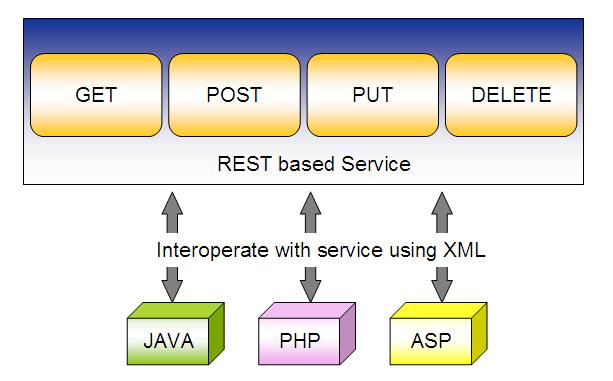
REST is an architectural style that used to write a web service in a certain way. It is based on web-standards and the HTTP protocol. This style was defined by Roy Fielding in 2000. 

In REST architecture the main concept is the Resource which can be uniquely identified by an Uniform Resource Identifier or URI. Every resource supports the HTTP operations.


In this post I'm going to describe how to implement a RESTfull web service which I am going to create as a standalone service with an embedded Jetty server. So you do not need to deploy it in a web container.

This is a simple web service to store and retrieve music track details.

Here is the pom.xml file which contains the relevant dependencies. You can see how the embedded Jetty server is configured through the maven-jetty-plugin and the port being set to 9090.


    4.0.0

    com.wso2.training.manorama
    RESTfulWS
    war
    1.0-SNAPSHOT
    RESTfulWS


            com.sun.jersey
            jersey-server
            1.18
        
        
            com.sun.jersey
            jersey-servlet
            1.18
        
        
            com.sun.jersey
            jersey-core
            1.18
        
        
            com.sun.jersey
            jersey-client
            1.18
        
        
            com.sun.jersey
            jersey-json
            1.18
        
        
            asm
            asm-all
            3.1
        
        
            javax.ws.rs
            jsr311-api
            1.1.1
        
        
            junit
            junit
            4.9
            test


                org.apache.maven.plugins
                maven-compiler-plugin
                2.5.1
                true
                
                    1.7
                    1.7


                org.mortbay.jetty
                maven-jetty-plugin
                6.1.22


                            9090
                            60000


        2.13
        UTF-8


This web service accepts requests in JSON format and responds with the same format.

Here is the data model Track.java

package com.wso2.training.manorama.model;

/**
 * Created with IntelliJ IDEA.
 * User: manorama
 * Date: 12/4/14
 * Time: 10:24 PM
 * To change this template use File | Settings | File Templates.
 */
public class Track {

    String title;
    String singer;

    public String getTitle() {
        return title;
    }

    public void setTitle(String title) {
        this.title = title;
    }

    public String getSinger() {
        return singer;
    }

    public void setSinger(String singer) {
        this.singer = singer;
    }

    @Override
    public String toString() {
        return "Track [title=" + title + ", singer=" + singer + "]";
    }

}
Now I will describe you how to implement the RESTfull web service for this. Here is the web service implementation class.

package com.wso2.training.manorama;

import com.wso2.training.manorama.model.Track;

import javax.ws.rs.*;
import javax.ws.rs.core.MediaType;
import javax.ws.rs.core.Response;

/**
 * Created with IntelliJ IDEA.
 * User: manorama
 * Date: 12/4/14
 * Time: 10:23 PM
 * To change this template use File | Settings | File Templates.
 */
@Path("/musicservice")
public class JSONService {

    @GET
    @Path("/randomtracks")
    @Produces(MediaType.APPLICATION_JSON)
    public Track getTrackInJSON() {

        // Here you can modify this code to get a random track from the available music tracks

        Track track = new Track();
        track.setTitle("Enter Sandman");
        track.setSinger("Metallica");

        return track;
    }

    @POST
    @Path("/tracks")
    @Consumes(MediaType.APPLICATION_JSON)
    public Response createTrackInJSON(Track track) {

        String result = "Track saved : " + track;
        return Response.status(201).entity(result).build();
    }
}

To map the incoming requests, we configure the web.xml (webapp/WEB-INF/web.xml)

    
        RESTfulWS
        com.sun.jersey.spi.container.servlet.ServletContainer
        
            com.sun.jersey.config.property.packages
            com.wso2.training.manorama
        
        
            com.sun.jersey.api.json.POJOMappingFeature
            true
        
        1
    
    
        RESTfulWS
        /*
    

When looking at the web service implementation java code, you can see the GET requests with the pattern /randomtracks come to the getTrackInJSON() method. It will respond with a Track object in json format. Note the @Produces(MediaType.APPLICATION_JSON) annotation.

The POST requests comes with the pattern /tracks will create a new Track object and responds with the HTTP 201 OK.The Track object should be in the json format. Note the @Consumes(MediaType.APPLICATION_JSON) annotation

     com.sun.jersey.api.json.POJOMappingFeature
     true

This will map the POJO class to json. Thus the posted json string will be converted into “Track” object automatically.

To deploy this you will need several libraries to be included in the webapp/WEB-INF/lib folder
  • asm-3.1.jar
  • jersey-client-1.18.jar
  • jersey-core-1.18.jar
  • jersey-json-1.18.jar
  • jersey-server-1.18.jar
  • jersey-servlet-1.18.jar
  • jsr311-api-1.1.1.jar 
Since this is a standalone service you do not need to deploy it in a web container. Simply run,

$ mvn jetty:run

To invoke this web service here is how to implement the client application.